PC tricks and Tips

Cool and amazing PC tips and tricks which will help you...

Games

Cool and amazing games.This contains Cheats and much more

Requests

You can comment on this post for any help or any requests

Facebook chat tricks

Cool and amazing Facebook chat trick.Try these and amaze your friends....

Mobile

Cool and amazing mobile Tricks and Tips which will help you....

Related Posts Plugin for WordPress, Blogger...
Showing posts with label Android. Show all posts

Saturday, 10 November 2012

Samsung Galaxy Note 800 Full Specifications

Hello friends,
In this post I will show you the new Samsung Galaxy Note 800 Full Tablet Specifications.....
This is the most purchased Tablet in the whole world....It is also the best multitasking Tablet I have ever seen.....
Note, the new way

Samsung Galaxy Note 800 Full Specifications

Network

  • HSPA+ 21Mbps 850/900/1900/2100
  • EDGE/GPRS 850/900/1800/1900

Processor

  • 1.4GHz Exynos Quad-Core Processor 

Display

  • 10.1" WXGA (1280x800) LCD

OS

  • Android™ 4.0 (Ice Cream Sandwich)

Camera

  • Main (Rear): 5 Megapixel Auto Focus Camera with LED Flash
  • Sub (Front): 1.9 Megapixel Camera

Video

  • Codec: MPEG4, H.263, H.264, VC-1, DivX, WMV7, WMV8, VP8
  • Format: 3GP(MP4), WMV(ASF), AVI, FLV, MKV, WebM
  • Playback/ Recording: 1080p Full HD@30fps, 720p HD@30fps

Audio

  • Codec: MP3, Vorbis, WMA, AAC, ACC+, eAAC+, AMR(NB,WB),
    MIDI, WAV, AC-3, Flac
  • Music Player with SoundAlive
  • 3.5 mm Ear Jack

Enterprise Solutions

  • Exchange ActiveSync
  • On-Device Encryption
  • Cisco VPN (Virtual Private Network)
  • Uniper Junos Pulse VPN

    Sensor

    • Accelerometer, Digital compass, Light, Gyroscope

    Connectivity

    • Bluetooth technology v 4.0 (Apt-X Codec support)
    • AllShare Play / AllShare Cast
    • Kies / Samsung Kies air
    • USB 2.0 Host
    • Wi-Fi 802.11 a/b/g/n (2.4 & 5 GHz), Wi-Fi Direct
    • Wi-Fi Channel Bonding

    Memory

    • 16GB User memory + 2GB (RAM)
    • microSD (up to 32GB)

    Dimension

    • Dimension: 262 x 180 x 8.9 mm
    • Weight: 600g (3G), 597g (WiFi)

    Battery

    • Standard battery, Li-ion 7,000 mAh

    Value-added Features

    • S Pen Experience (6.5 mm S Pen, S Note, S Planner etc.)
    • Multi Screen
    • Adobe® Photoshop® Touch
    • Pop up play
    • Smart Stay
    • Samsung TouchWiz
    • Video Wall
    • Samsung Apps
    • Samsung Hub
      Readers Hub*/ Music Hub/ Game Hub/ Video Hub*
    • Samsung S Suggest (App recommendation service)
    • Samsung ChatON mobile communication service
    • Google™ Mobile Services
      Google Play™, Gmail™, YouTube™, Google Maps™,
      Syncing with Google Calendar™, Google Search, Google +
    • Polaris office
    • A-GPS (3G version)
    • S-GPS (WiFi version)
    • Glonass

You Might Also Like:


Samsung Galaxy Note 2 Specifications

Hello Friends,
Here is the post you guys were waiting for..This post will tell you the new Samsung Galaxy Note II Full Specificatons.The Specifications Are listed below:

Samsung GALAXY Note 2

 Full Phone Specifications of the new Smart phone Samsung Galaxy Note II


Network

  • 3G: HSPA+21Mbps
    (HSDPA 21Mbps / HSUPA 5.76Mbps)
  • 4G LTE: 100Mbps / 50Mbps

Processor

  • 1.6 GHz quad-core processor

OS

  • Android 4.1 (Jelly Bean)

Display

  • 140.9 mm (5.5") HD Super AMOLED (1,280 x 720)

Dimension

  • 80.5 x 151.1 x 9.4 mm, 180g

Battery

  • Standard battery, Li-ion 3,100mAh

Memory

  • 16/32/64GB User memory + 2GB (RAM)
  • microSD slot (up to 64GB)

    S Pen Optimized Features

    • S Pen Experience
      - S Note, S Planner, Email with hand-writing
        integration
      - S Pen Keeper
      - Quick Command, Easy Clip, Photo Note,
        Paper Artist
      - Shape Match, Formula Match

    1 Step tasking / Multitasking features

    • Air View
    • Popup Note, Popup Video
    • Page Buddy / Tag Buddy / Word Buddy

    Connectivity / Sharing Features

    • Bluetooth® v 4.0 (Apt-X Codec support) LE
    • USB 2.0 Host
    • WiFi 802.11 a/b/g/n (2.4 & 5 GHz), Wi-Fi HT40
    • Wi-Fi Direct
    • NFC
    • S Beam
    • Samsung AllShare Play & Control
    • Samsung AllShare Cast (WiFi Display)
      - Mirroring & Extention
    • Samsung AllShare Framework

    Other

    • Samsung TouchWiz / Samsung L!ve Panel
    • Samsung Kies /Samsung Kies Air
    • Samsung ChatOn mobile communication service
    • Smart Stay, Direct claa, Screen Recorder,
      Quick Glance
    • Samsung ChatOn mobile communication service
    • Samsung S Suggest

      Camera

      • Main (Rear) : 8 Megapixel Auto Focus Camera with LED Flash, BSI
      • Sub (Front) : 1.9 Megapixel VT Camera, BSI
      • Best Photo, Best Face, Low light shot

      Video

      • Codec: MPEG4, H.263, H.264, VC-1, DivX, WMV7, WMV8, WMV9, VP8
      • Format: 3GP(MP4), WMV(ASF), AVI, FLV, MKV, WebM
      • Full HD(1080p) Playback & Recording

      Audio

      • Codec: MP3, OGG, WMA, AAC, ACC+, eAAC+, AMR(NB,WB), MIDI, WAV, AC-3, Flac
      • Music Player with SoundAlive
      • 3.5mm Ear Jack

      Content / Services

      • Samsung Apps
      • Samsung Hub
        - Game Hub
        - Media Hub (US only)
        - Learning Hub / Music Hub / Video Hub
        ※ The availability of each Samsung Hubs may
            differ by country

      Sensor

      • Accelerometer, RGB Light, Digital Compass, Proximity, Gyro, Barometer

      GPS

      • A-GPS
      • Glonass

      Enterprise Solutions

      • On Device Encryption (H/W)
      • Microsoft Exchange ActiveSync
      • VPN(F5, Cisco, Juniper)
      • MDM(Sybase Afaria, MobileIron, SOTI, Good)
      • CCX
      • VMware MVP      


You Might Also like:


Saturday, 25 August 2012

Titanium backup pro key root free download for android

This is one of the top paid apps on the Google play store is running successfully...!!! It has very good reviews..I will give it a perfect 5 star...!!!


Description:
 Titanium Backup is the most powerful backup tool on Android, and then some. You can backup, restore, freeze (with Pro) your apps + data + Market links. This includes all protected apps & system apps, plus external data on your SD card. You can do 0-click batch & scheduled backups. Backups will operate without closing any apps (with Pro). You can move any app (or app data) to/from the SD card. You can browse any app’s data and even query the Market to see detailed information about the app.


More Titanium power: Apps freezer, multi backups, 0-click restore and WAY MORE!
 Your PRO Key for Titanium Backup!
• Voted #1 TOP ROOT APP on Twitter.
• Check out the Pro DEMO VIDEO below!
• No icon! Requires the Titanium Backup (free) app (see "More" section below). This key will turn it into PRO.
• The same key can be used on several devices!
• For download issues & support: read below.
PRO Features Added:
[✔] Multiple backups per app
[✔] 0-click batch restore
[✔] Backup/restore SMS,MMS,calls,bookmarks,Wi-Fi AP as XML
[✔] Multi-user support for some apps! (eg: games)
[✔] Batch verification
[✔] Backup apps without closing them!
[✔] Restore individual apps+data from CWM backups!
[✔] Restore individual apps+data from TWRP backups!
[✔] Hypershell speed
[✔] Migrate system data across different ROMs
[✔] Market Doctor (relink apps to Market)
[✔] "Destroy all Market links" feature
[✔] Apps freezer (incl. batch support)
[✔] Market "auto updating" manager
[✔] Convert user apps <=> system apps
[✔] Encryption
[✔] Unlimited schedules
[✔] Sync to/from Dropbox (manual/scheduled)
[✔] Sync to/from Box (manual/scheduled)
[✔] Sync to/from Google Drive (manual/scheduled)
[✔] Load/Save a Filter and use it in Widgets/Schedules
[✔] Change the device's Android ID, restore it from a backup or after a factory reset
[✔] Protect backup against deletion
[✔] Send backup (to e-mail/cloud) and import it in 1 click
[✔] Backup→Verify→Un-install an app in one shot
[✔] Freeze/defrost/launch apps in a single click
[✔] CSV export any app DB (e-mail or Google Docs)
[✔] Brand the app with your name
[✔] Bloatware Melter (experimental)
[✔] Convert app data to/from faster WAL DB format
[✔] And more!
More Memory:
[✔] Dalvik cache cleaner
[✔] Integrate system app updates into ROM
[✔] Move apps into ROM
[✔] Integrate Dalvik cache system elements into ROM
What the Press says:
"The Most Essential App For Android" - Tech'n'Life
"NONE can compare with this one" - Android Market Review
"The Best Backup App for Android" - Lifehacker
"The hands down best Backup on the market" - Absolutely Android
"It is a must-have backup app" - Droid Ninja
Support & Upgrades:
• All upgrades are FREE.

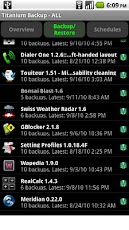
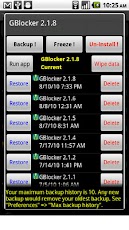
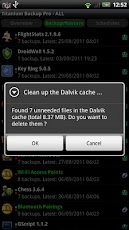
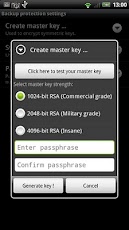
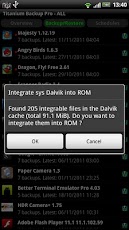
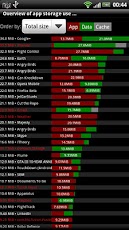
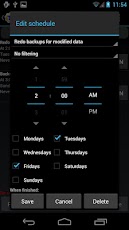
Screen shots


Videos:

Download it for free
Torrent
Direct download

Please comment after trying

Sunday, 29 July 2012

Secret codes for your Android phones which you might not have heard off...

Secret codes for your android phones.....These codes below will let you know the functions given next to the codes...!!!
Please be careful wile typing those codes since some of them can even destroy your phones operating system....
I am not responsible for any damage caused by your mobile


Please note: Some codes mentioned here can be dangerous.


*#*#4636#*#* - Phone / Battery / USage information
*#*#7780#*#* - factory data reset
*2767*3855# - factory format
*#*#34971539#*#* - information about phone camera
*#*#7594#*#* - End Call / Power
*#*#273283*255*663282*#*#* - File copy / backup
*#*#197328640#*#* - Service mode.

WLAN, GPS and Bluetooth Test Codes:

*#*#232339#*#* OR *#*#526#*#* OR *#*#528#*#* - WLAN test (Use "Menu" button to start various tests)
*#*#232338#*#* - Shows WiFi MAC address
*#*#1472365#*#* - GPS test
*#*#1575#*#* - Another GPS test
*#*#232331#*#* - Bluetooth test
*#*#232337#*# - Shows Bluetooth device address
*#*#8255#*#* - This code can be used to launch GTalk Service Monitor.

GET FIRMWARE VERSION INFORMATION:

*#*#4986*2650468#*#* - PDA, Phone, H/W, RFCallDate
*#*#1234#*#* - PDA and Phone
*#*#1111#*#* - FTA SW Version
*#*#2222#*#* - FTA HW Version
*#*#44336#*#* - PDA, Phone, CSC, Build Time, Changelist number

CODES TO LAUNCH VARIOUS FACTORY TESTS:

*#*#0283#*#* - Packet Loopback
*#*#0*#*#* - LCD test
*#*#0673#*#* OR *#*#0289#*#* - Melody test
*#*#0842#*#* - Device test (Vibration test and BackLight test)
*#*#2663#*#* - Touch screen version
*#*#2664#*#* - Touch screen test
*#*#0588#*#* - Proximity sensor test
*#*#3264#*#* - RAM version

Please comment if you have any doubts or if you have some more codes which aren't mentioned here in this post

Saturday, 21 July 2012

3 Wallpapers in Temple run which is supposed to bought by buying it with 5000 coins

Temple run Wallpapers inapppurchases
Hello friends,I have the 3 wallpapers in the app temple run which is supposed to be bought by paying them 5000 coins......Enough waiting,No buying,No playing.....!!!!The pictures for your game is given below:
And it is in HD quality....!!!!Please comment after trying....!!!!

Monday, 18 June 2012

Tips to keep your Android Mobile safe

With the amount of information we keep on our smartphones, it's increasingly vital that we protect them and the data they house. I don't want to sound like a fear-monger, but the fact is your phone can be lost or stolen, it can be destroyed, or its contents can be hacked via malware. Here are a few basic and advanced tips to consider to protect everything from your work files to contact information.

The Basics: Keep Your Phone Locked
It's extremely easy and effective to lock down access to your Android phone using built-in tools. Simply tap your way to the "Location and Security" setting. There you can create either a standard password or a screen lock pattern. If you use the screen lock pattern tool, be sure not to make an extremely easy and obvious pattern.

Android Mobiles Security Tips

For Added Security: Hidden Lock adds an extra layer of security that is easy to implement but hard for would-be thieves to crack. After you have unlocked your phone using a password, Hidden Locks requires you to tap a hidden button before you can use the phone.

Avoiding Malicious Apps
Viruses and other malware are increasingly targeting the Android platform, so it's important to take a few precautions to avoid infecting your own phone or tablet.

For the ultimate in security, I recommend only downloading apps from the official Google Playstore, where they have been vetted. Scammers have been known to create fake versions of popular apps, which are loaded with malware and only available at third-party websites.

However, some apps may simply not be available on the app store. If you see an intriguing app, you can verify its reputation by searching for it on Google and seeing if it has been written about, positively or negatively. Be wary of totally obscure apps.

Note App Permissions
Take the time to learn what permissions an app wishes to access, from making phone calls to using your system tools. While it makes sense that a social networking app may wish to access your contacts, it doesn't make sense that a "dancing dog" app would. Be wary when apps ask for more than seems to make sense.

Consider an Anti-Virus
Finally, you can consider an anti-virus program for Android. Savvy users may not need these programs, but apps like Lookout Security & Antivirus do offer powerful features for added protection.

Find Your Lost Phone and Erase Data Remotely
Thanks to GPS and wireless Internet, you can locate a missing Android phone using one of the several apps available. I recommend Android Lost (free). Even with your speakers turned off, you can use this app to play a sound, which is handy when you simply lose the phone in your house. Furthermore, this app also enables you to erase all the phone's data, saving your contact information and files from prying eyes.

You can also take pictures from your camera to know who is using your phone. And better yet: This app can be installed remotely, so you can install it after you have lost your phone. (However, I strongly recommend installing it right away.)

And Don't Forget Physical Mishaps
All the security measures in the world won't matter if your phone breaks from a simple drop. Be sure to invest in a quality case.

Also visit kithapathigmares.blogspot.com for Games

Sunday, 17 June 2012

The Batman The Dark knight Rises Game for Android and iOS [hottest game]


Gameloft has officially announced a Batman: Dark Knight Rises mobile game in conjunction with the upcoming movie, which will support devices running both Google's Android and Apple's iOS mobile operating systems.
The trailer, which you can check out below, looks set to be the sole accompaniment to the final installment of the Christian Bale-featuring Batman trilogy. Although the title will be based on the actual motion picture to a degree, it will not follow the exact same plot, as not to steal the thunder and spoil the surprises packed into the movie.
The Dark Knight mobile game ios android
The trailer demonstrates much of the combat situations associated with the Batman films, although fans will still be able to mosey on through Gotham City in what presents itself as a free environment as opposed to a set path.
It will be released some time this summer, but with the game still being a work in progress, no ETA's have yet been revealed. Given that Warner Brothers Studios has some input on the game, expect it to be a pretty full-on and accurate representation of the flick, which will be hitting a cinema near you on July 19th.
While the last installment, entitled the Dark Knight, gained huge public interest due to the untimely death of Heath Ledger, it was, in actual fact, a cracking movie, and I would suspect the majority of Batman enthusiasts and movie fans in general will be hoping the final iteration does the trilogy justice and leaves on a high.
No details have emerged with regards to a release date of the mobile title, although if history is anything to go by, it is highly likely that the iOS version will drop prior to the Android one, a trend which, despite the advances of Android, continues to be the norm with mobile releases. Then again, with Gameloft being such a power releaser of mobile titles, there still remains a shout both will release contemporaneously.Watch the trailer on http://m.youtube.com/watch?desktop_uri=%2Fwatch%3Fv%3DIrLplomkO78%26feature%3Dplayer_embedded&feature=player_embedded&v=IrLplomkO78&gl=IN


Only on zhacks.blogspot.com


Download The Dark Knight Rises for Android – $6.99 [Google Play Store Link]
Download The Dark Knight Rises for iPhone and iPad – $6.99 [iTunes App Store Link]


Recover deleted files on Android devices

We can all empathize with the sinking feeling felt when something important is erroneously deleted from our smartphones, but instead of becoming lost for good, the DiskDigger team has created an Android app to help you recover those precious files you thought had disappeared into the Recycle Bin of no return.

DiskDigger is a household name already, and if you're a Windows user, you may already have been acquainted with the tool that spares your files from the hangman's noose at the eleventh hour. The tool carries all of its strengths through to Android, and if you've recently deleted a file and are having second thoughts, DiskDigger is arguably your best hope of a reprieve.

unnamed

Like the Windows iteration, it's absolutely free of charge, although does understandably require root access in order to work its magic. Currently in beta stage, it will recover recently deleted images with aplomb, and like any respectable app, it keeps its user interface as minimalistic as possible, as not to bamboozle those downloading it.

unnamed

Far from one-dimensional, it uses a variety of different techniques in order to achieve its goal. Of course, there are no guarantees, but having tested it ourselves, it performed flawlessly, and having encountered many similar apps in the past, DiskDigger has to be among the best. When you launch it, you've the option of sifting through each partition of your device's storage. All you need to do is select the one which contained those images before you opted to remove them, and tap Scan device.From then, you can also refine your search down to the specific file type, and those found will appear in the corresponding window on the left hand side of the UI.

unnamed (1)

You can preview each file discovered, and simply hit Save,which will in turn present you the opportunity to restore the files to the location of your choosing. A Mail button is also included which lets you e-mail the images to an address of your choice, and although this no-frills app doesn't necessarily boast the various features offered by similar apps, it does a stellar job of what it proclaims to do.

Download DiskDigger for Android [Google Play link]


Wednesday, 30 May 2012

Download Google Chrome For Android


Google Chrome browser until now as my favourite browser for browsing internet. Lightweight, fast, and simple, make me more prefer using Google Chrome besides Firefox dan Internet Explorer. Now, you get this one Google Chrome browser for your android.


Features:
- Browse fast with accelerated page loading, scrolling, and zooming
- Search and navigate directly from the omnibox
- Open and switch between unlimited tabs in an easy-to-view stack
- Sign in to Chrome to sync your bookmarks and view tabs you have open on your computer
- Send pages from desktop Chrome to your smartphone or tablet with one click and read them on the go, even if you’re offline
- Browse privately in Incognito mode


Download Now!, It's FREE : Chrome for Android ( Android Market )

Download FIFA 12 For Android QVGA & HVGA


FIFA 12 for android phone has been released out. Now you can download for your android smartphone play on it. Without any lagging on play, QVGA type for Samsung Galaxy Mini device and other qvga and HVGA types for Sony Xperia Live and other hvga.

Download apk :

QVGA - EA_SPORTS_FIFA_12_v1.2.5_QVGA_Cracked_Nops.apk
HVGA - EA_SPORTS_FIFA_12_v1.2.5_HVGA_Cracked_Nops.apk

Password : iqbal244

Download data :

http://www.disedot.in/androgames/com.ea.game.fifa12.zip.001
http://www.disedot.in/androgames/com.ea.game.fifa12.zip.002
http://www.disedot.in/androgames/com.ea.game.fifa12.zip.003
http://www.disedot.in/androgames/com.ea.game.fifa12.zip.004
http://www.disedot.in/androgames/com.ea.game.fifa12.zip.005
http://www.disedot.in/androgames/com.ea.game.fifa12.zip.006
http://www.disedot.in/androgames/com.ea.game.fifa12.zip.007


UPDATE LINK


FIFA 2012 QVGA
FIFA 2012 HVGA
FIFA 2012 Data & Apk torrent


How to install??
1. Join all data FIFA 12 using HJSplit
2. Install apk
3. Extract data to android>data


This might me legally offensive.I am not responsible for the things done by you

Sunday, 27 May 2012

Best keyboards for android

Jwisser/Flickr

The advent of the smartphone and the emergence and increasing popularity of tablets has changed the way people communicate. Voice-calling has almost taken a backseat, with a lot of users primarily using their handhelds for internet browsing, email, and some, even for writing complete documents, spreadsheets, etc.

Capacitive touchscreen technology and the increasing size of smartphone screens has made it easier for users to type long messages, emails, and notes on a full QWERTY virtual keyboard. Remember the time when typing a "C" required you to tap the 2 key on the phone number pad three times, in quick succession?

Unfortunately, for many consumers, touchscreen keyboards aren't that easy to use, and most users are quite unhappy with the stock keyboards available on their devices. This has led to the emergence of many third-party virtual keyboard applications. Apart from just providing a full keyboard, these apps are also smarter, featuring word-completion recommendations using built-in dictionaries, swipe and slide features for easy typing, and, in the case of tablets, thumb keyboards for typing on the much larger screens.

Today, we'll talk about some of the best keyboards available for Android smartphones and tablets. Here are are few things that you will need to know about the video:

  • Since many find typing on larger screens slightly difficult, we will be using a tablet for our purposes.
  • The ColorNote Notepad app is used to show the functionality of the various keyboards.
  • The input methods were configured in Settings beforehand.

Let's take a look.

SwiftKey Tablet X

SwiftKey X is one of the most popular third-party Android keyboards available on the Google Play Store. It boasts a number of useful features, including:

  • The tablet application features smaller keys and a layout for thumb typing.
  • An impressive word prediction system that not only completes words but also gives you an option for what you may want to type next.
  • Keyboard options include Settings, Voice Input, Share, and Support.
  • "Learn from Facebook, Gmail, Twitter, and RSS feed" option allows the keyboard to use and sync words you've used on the mentioned sites.
  • Theme options include Neon, Light, Pumpkin, and Dark.
  • Advanced settings feature Typing style, Spacebar options, Autocap options, haptic feedback, and voice recognition settings.
  • Swiftkey X stats, which shows how much your efficiency improves and how many keystrokes you save when using Swiftkey X.
  • You can quickly switch between the regular and the split keyboard layout.

As you can see, Swiftkey X features comprehensive settings options and customization abilities, which make it one of most popilar keyboard apps in the Play Store. You can download the keyboard from the Google Play Store here (phone version) and here (tablet version) for $2.99. There is also a 1-month trial version available.

SlideIT

SlideIT is a keyboard app with swipe capabilities, a la the Swype keyboard, where you "slide" from letter to letter to type out a word. Features include:

  • An extensive word recommendation dictionary.
  • Voice recognition capability and up to four pages for punctuation and symbols.
  • Choice between regular typing or using the slide feature.
  • Multiple language settings available.
  • Settings include Language options, Look and Feel settings, Preferences, Share, Skins, and Speech-to-Text settings.
  • "Look and Feel" settings feature a choice between SlideIT 3D and Classic skins, Landscape and full screen modes, Long press duration, and visual settings reset.
  • "Import Contacts" allows the keyboard to recognize the names that you type.

I use the SlideIT keyboard, but I personally find the slide function quite difficult on the larger screen of a tablet, but very convenient on my smartphone. You can download the keyboard from the Google Play Store here. It is currently on sale for $0.99. There is also a 15-day trial version available for free as well.

Thumb Keyboard

The Thumb keyboard, as the name suggests, is ideal for thumb typing, which is especially useful for tablets. It also features a lot of advanced functions that improve productivity. Features include:

  • Stock configuration features large tiles ideal for typing on a tablet. Features two separate panels for numbers, punctuation, and symbols.
  • Various layout options include – Phone Standard, Phone Split Large, Phone Split Compact, Phone/tablet 5″, Tablet 7″ Layout 1, Tablet 7″ Layout 2, Tablet 10″/9″ Layout, and a Custom Landscape/Portrait combination.
  • Comprehensive word-completion suggestion function.
  • Further layout customization allows you to set a thumb keyboard option for one hand and also features a full (standard) layout keyboard.
  • Highly-responsive and easy to use.

As you can see, it has multiple optimization options for devices of all sizes and types, and is certainly very easy to use. You can download the Thumb keyboard for $2.99 from the Google Play Store here.

LogiType Keyboard

Logitype uses a groundbreaking technology that moves and resizes keys while you type to accommodate your typing style. The layout also mimics a PC keyboard, which gives new users a sense of familiarity and ease when typing. Features of this keyboard include:

  • Learns where your hands are to give a more fluid and customized approach.
  • Includes a horizontal number pad layout, page up and page down keys, arrow keys, and a tab button similar to a PC keyboard

If you find standard keyboards uncomfortable and are looking for a close-to-PC experience, this is the keyboard for you. You can download it for free from the Play Store here.

ICS Keyboard

If you're one of the many unlucky Android users still stuck on an older version of Android and looking for a slice of Ice Cream Sandwich, this is the keyboard for you. Features include:

  • This is a standard layout and is not a thumb keyboard.
  • Portrait mode on the tablet is very similar to using the keyboard on a smartphone.
  • Multiple pages for numbers, punctuation, and symbols.
  • Voice recognition capability.
  • Settings include haptic feedback, longpress options, and keypress options.
  • While the keyboard is free, a donationware version features theme and background settings, change height, and dictionary.

You can download ICS keyboard here.


Zhacks