PC tricks and Tips

Cool and amazing PC tips and tricks which will help you...

Games

Cool and amazing games.This contains Cheats and much more

Requests

You can comment on this post for any help or any requests

Facebook chat tricks

Cool and amazing Facebook chat trick.Try these and amaze your friends....

Mobile

Cool and amazing mobile Tricks and Tips which will help you....

Related Posts Plugin for WordPress, Blogger...
Showing posts with label PC. Show all posts

Saturday, 8 September 2012

Delete,Open or edit cookies on your PC

Deleting cookies is very important as it is not secure to keep them especially in cyber cafe's...!!!

What are cookies?
Cookies are the files that keep your passwords of all the Login pages you open and try to open....!!!
Example:
Sometimes when you don't logout from your Facebook account and try opening Facebook again you can see your profile already logged on....This happens because of these cookies..!!!

If you don't delete them people can access your accounts without your password...!!!

Here this is how to delete them according to the browsers:

Internet Explorer 6.0
1. Click "Tools," then "Internet Options."
2. On the General tab, in the "Temporary Internet Files" section, click the "Delete Files" button.
3. Select "Delete Cookies."
4. Click "Close."
5. "Quit" the browser.

Internet Explorer 7.0
1. Click "Tools," then "Delete Browsing History."
2. In the "Temporary Internet Files" section, click on "Delete Files" and select "Yes."
3. In the "Cookies" section, click on "Delete Cookies" and select "Yes."
4. Click "Close."
5. "Quit" the browser.

Internet Explorer 8.0
1. On the Internet Explorer Tools menu, click "Internet Options."
2. The Internet Options box should open to the General tab.
3. On the General tab, in the Browsing History section, click the "Delete…" button.
4. In the "Delete Browsing History" window that comes up, make sure that "Temporary Internet Files" and "Cookies" are selected.
5. Click the "Delete" button and restart the browser.

Safari 3.0 and 4.0
1. Open Safari.
2. Select "Empty Cache."
3. Click "Empty" on the "Are you sure?" message.
4. Select "Preferences," then the Security tab, "Show Cookies," "Remove All."

Firefox 3.0 for PCs and Macs
1. Click "Tools" and select "Clear Private Data."
2. Make sure that "Cache" and "Cookies" are selected.
3. Click on "Clear Private Data Now."
4. Exit and relaunch browser.

Firefox 3.5 for PCs and Macs
1. Click "Tools" and select "Clear Recent History."
2. Make sure that "Cache" and "Cookies" are selected.
3. Click on "Clear Now."
4. Exit and relaunch browser.

Google Chrome for Macs
1. Click the "Chrome" category and select "Clear Browsing Data."
2. Make sure that "Empty the cache" and "Delete cookies and other site data" are selected.
3. Click on "Clear browsing data."
4. Exit and relaunch the browser.

Google Chrome for PCs
1. Click the "wrench" icon in the top right-hand corner and select "Options."
2. In the "Under the Hood" tab, click the "Clear browsing data..." button.
3. Make sure that "Empty the cache" and "Delete cookies and other site data" are selected.
4. Click on "Clear browsing data."
5. Exit and relaunch the browser.

Please comment after trying....!!!
If you have any questions regarding this article you can contact us by posting comments on the request section or the article you have doubts on...!!!!

Top 5 themes for windows 7

I have recently come across some inspiring themes for windows 7 am I think that will inspire you too....!!!
This is the top 5 themes for Windows7..!!! All of them are extraordinary and I think that is what you guys are looking for...!!!!
Please don't forget to comment after trying.....!!!!!

1- BlueVision Alpha
Blue vision aplha v2.0 is one of the best rainmeter skins, you'll Get lot of attractive widgets in this theme, you can make it more awesome by changing background.
blue+vision+alpha.jpg (1167×647)
Download
2- Jarvis (iRon Man Skin)
Jarvis is a Iron main inspired rainmeter skin, you can convert into hackers theme using new widgets and changing background image,Jarvis skin's centrel interface is damn cool.

Download
3-Tron Legacy ( 3D desktop )

Download
4- Alien 3d Rainmeter Skin
alien 3d is amazing skin, it will give a 3d Look to your desktop

Download
5- Blue HDD

Download
Experiment : You can Make your desktop more amazing and awesome, by merging all skins's widgets/pulgins together , take a look, i've made it with blue vision alpha and jarvis

Sunday, 29 July 2012

Write your name instead of Am/Pm on your taskbar below

Cool PC trick
No download or no registry editting,
Are you wondering how to do soo.....
You can do soo if you follow my guidelines which is below:

FOR WINDOWS 7 USERS

Go to -> Start -> Control Pannel -> Regional and Language Option -> Click on Additional settings -> Go to TIME Tab -> Change AM symbol and PM symbol from AM and PM to ur name -> Apply ->ok Thats it.. Enjoy...
FOR WINDOWS XP USERS

Go to -> Start -> Control Panel -> Regional and Language Option -> Click on Customize -> Go to TIME Tab -> Change AM symbol and PM symbol from AM and PM to ur name -> Apply -> Ok

Hope you liked this Trick, do share your views in the comments below.

Please comment after trying....

The preview is given below:

Saturday, 28 July 2012

Use your Mouse pointer on your computer using your keyboard

If your mouse isn't working I have a trick that will let you use your mouse pointer through your keyboard...!!!!
Yes,you heard it right it is possible and is amazing....!!!!


To turn on MouseKeys, go on Control Panel, click on Accessibility Options, click on the tab that says Mouse, and check the ‘Use MouseKeys‘ box. Alternatively, you could turn on MouseKeys by pressing Left ALT + Left Shift + Num Lock at the same time. Please note that this only works with the LEFT alt and shift, as if you try it with the right side, it will not work.
Here are the controls, provided that you have a numeric keypad, to run MouseKeys:
2 = Move Down
8 = Move Up
4 = Move Left
6 = Move Right
7 = Move Diagonally Top Left
9 = Move Diagonally Top Right
1 = Move Diagonally Bottom Left
3 = Move Diagonally Bottom Right
5 = Simulate Mouse Single Left Click
(+) = Simulate Mouse Double Click
(-) = Simulate Mouse Right Click
(*) = Simulate Both Mouse Buttons


Click At Once
If you’ve tried this, you may have noticed that the speed of the cursors is really slow. To speed this up, you just go into Settings, and change the speed.


Just drag the sliders along to the maximum speed and acceleration, and it should be absolutely fine. Enjoy..!!

Please comment after trying

Wednesday, 25 July 2012

Get serial number,patch or keygen for any software for free

It is really hard to get a keygen,key or a serial key for a software...So i came up with a post that will help you find a serialkey,patcch,keygen or a key for any software...!!!
And i guess that is what you are looking for....!!!!

Follow the steps to know the CD key or Serial number...etc

1. Go to google.com
2.Type this syntax in search bar ” 94FBR Product name with desired software” for example :

94fbr nero
94fbr avast
proxifier 94fbr
etc


94FBR was part of a Microsoft Office 2000 product key that was released on the internet that bypassed Microsofts activation system.Because it is a relatively uncommon term, when you add it to your search queries, it will generally return results of pages listing illegal serial numbers.

Thursday, 12 July 2012

Create shortcuts on your computer


Hello,Friends i am here with a new post that will let you create shortcuts on your computer as the title suggests and it is extraordinary but no one can do it.......If you follow my Guidelines you can do it.........!!!


Here's a tool to add folder or application shortcuts to your "My Computer" or "Control Panel" in Windows.
My Computer Manager is a free Windows app that lets you do that.

Add shortcuts to My Computer in Windows

To add shortcuts, just install the application and specify the location where the shortcut will be displayed.

Add shortcuts to My Computer in Windows

This can be handy if you want to access your favorite folders or files with few clicks; while keeping your desktop clean.

Download My Computer Manager

Hide desktop icons

Hello friends here i am with an awesome trick that will let you hide all your icons......!!!

As you can see in the picture above the icons won't be visible and you can't even click the icons as they are hidden....!!!
Follow my steps:
Step1:Right click on your desktop

Step2:Click on Show Desktop icons

That's it and if you want your icons back repeat the same process again..........!!! 

Tuesday, 26 June 2012

Control you PC using a Mobile


Yeah you have heard it right.Are you thinking how is it possible. I will show you how. In this post I will show you a step by step process which will let you control your PC from your mobile (iOS,Android).

A software named TeamViewer will let you control your PC/LAptop using a iOS device or and Android.


Step 1:Download it from the link below:
Windows icon


Linux icon   Mac icon  iPhone / iPad / Android icon 
 
Step 2:SIgn up from the link below:

https://wa137.teamviewer.com/register.aspx

Step 3:Login with your password and your Email ID in the software and also do the same thing to your iOS device or your Android 

Step 4:Click on Connect with Partner

Thats it ....!!!Now you can control your PC using a mobile

If you are software other than Teamviewer - LOGMIEN 

Friday, 22 June 2012

Create a Invisible folder

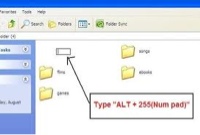
There are a lot of folder tricks in zhacks.blogspot.com.In this post I am not going to teach you how to hide a file.This is completely different . When I say a Invisible folder you can access the folder but the thing is that it cannot be seen by anyone except you since you know where it is.I will show you how..!!!

First create a folder
Secondly rename it . While renaming it Hold ALT and type 255 from your NumPad . When you type this you can see a invisible space over there...!!!


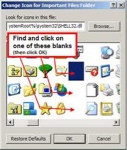
Then after that Right click on your Folder and click on Properties and click on choose icon.........!!!
Now this is the final step choose a invisible icon on the Popup....!!!


That's it...!!!!Enjoy

Saturday, 16 June 2012

Rename multiple files in just a single go

You can rename more that one file simultaneously in Windows.

The trick is to select all the files you want to rename. You can also select any files in a folder by using the CTRL key.


Now, right-click any one of the selected files and select rename.
Type a name for the file.
You can also use the F2 key to rename files.


Once the process of renaming is complete, the names of the selected files will also change to the typed value, except that numbers will be appended to that name.


You can also control the starting number in the series. To achieve this, type a number you want to start with in parenthesis after the filename, while renaming a file.

For example, if you type "Zhacks(7)" as the name, the other files will be numbered from "Zhacks(8)"..... respectively.


Control your mouse using your keyboard

How to Turn ON MouseKeys?

1. Hit Left ALT + Left SHIFT + Num Lock (Press and hold both the left ALT and left Shift keys, and hit the NumLock key). This opens a small Mousekeys box.


2. Click Ok to keep enable MouseKeys. Once enabled, a MouseKeys icon is displayed in the system tray. You can also increase/decrease the speed of the mouse cursor by clicking Settings.

That's all! Move the mouse pointer using the keys on the numpad of your keyboard.

Off course! If you don't remember the shortcut, there are other ways to enable/disable this feature :
Go to Control Panel >> Accessibility Options. Click on the Mouse tab and check Use MouseKeys.
Click Ok. Just uncheck MouseKeys to disable it.

Thursday, 14 June 2012

Wallpapers for PC [HD]


This allows you to download HD pictures for PC and can be used as wallpapers

It's awesome pict for your Desktop, get its....use for your nice desktop.
Fantasy Wallpapers
Resolution: 1600x1200 -2560x1600 | 125 MB
Download:
Fantasy Wallpapers Uploadbox

Fantasy Wallpapers Sharingmatrix

Friday, 8 June 2012

Vebest icons arranger

Here I will show you a best way to arrange your icons in a attractive way....!!!

This is extremely awesome...!!!
Try this and please do comment on this post

You can download this icon arranger by clicking this link:
http://www.vebest.com/files/SetupBIG.exe

Change your log in background on Windows 7

It has been tested successfully with the final version of Windows 7 (RTM) and Windows 7 RC 7100. It works with Windows 7 Home Basic, Home Premium, Professional, Ultimate and Enterprise, in x86 or x64 (32 or 64 bits). It does NOT work with Windows 7 Starter (edition sold with most netbooks). It works also on Windows Server 2008 R2 (but you are not supposed to customize a server).

Customize your welcome screen wallpaper

What does it do?

It does NOT change any system file, and the program itself does not requires admin rights to run : it will just ask you to run as admin a very simple cmd file that creates the required folder and registry key with the appropriate rights. Any user of the computer will then be able to change the Windows 7 logon screen wallpaper. You can also prevent users from being able to change the logon screen wallpaper if you don't want them to be able to modify it without administrator rights (option available by clicking on the "Settings" button).
It creates a few JPEG files based on the image you want to put as wallpaper for the Windows 7 login screen, applies the appropriate cropping and sizing and saves them using the best compression quality possible.


CLICK HERE=>DOWNLOAD

Change log:
Version 1.3.4 (2009-09-14) :
-fixed a bug where the user could launch the background application process multiple times when clicking on "Apply"
-fixed a bug with the sound file being truncated the first time it is played
-fixed a visual bug in the thumbnails
Version 1.3.3 (2009-09-13) :
-removed the splash screen
-added a mutex to prevent multiple instances from running at the same time
Version 1.3.2 (2009-09-11) :
Fixes the following bug
-When running the application as administrator, if the "background" folder is not created, the application can't apply the wallpaper and will ask to run "enable background change.cmd".
Adds a feature:
-Allows the user to prevent other users from changing the logon background wallpaper

Lock or unlock your computer using your face

Hey everyone KeyLemon Screen is a simple solution for locking and unlocking your computer using your face. When you move away, KeyLemon Screen automatically locks
your computer. When you come back, KeyLemon Screen unlocks your computer.

You don’t need to enter any password. All you need is just a webcam and
KeyLemon Screen software.
KeyLemon Screen is available from the link below just hit Download Now and unlock your PC just by Showing your face.

You can download this software from here:Download

Wednesday, 30 May 2012

Angry Birds Collection For PC. It’s FREE!


Have you been finished Angry Bird games? Yeah, I know this game very interesting and challenge BUT I will share for you, Angry Bird collection version Angry Birds original, Angry Bird Rio and Angry Bird Seasons. All in one games.

This Angry Bird version :
  1. Angry Birds (original version 2.0.2.1)
  2. Angry Birds Rio (version 1.4.2)
  3. Angry Birds Seasons (version 2.2)


How To Install?
  • Download this collectionHERE
  • Extract zip and place in desktop or another what you want.
  • Please make installation by click any setup file.
  • After finished installation, launch game and click on "ACTIVE FULL VERSION"
  • Paste a key that provided in text file
  • Done. Enjoy your games Angry Birder!

This is not crack version, but full version games

Angry Birds Space For PC. It’s FREE

The Angry Birds Space leaderboard is online and ready for your scores. Walkthrough pages are also up, so feel free to provide your strategies and help us track down those minimum 3 star scores.


30 brain-teaser, extremely difficult levels in an episode called Danger Zone. Our video walkthroughs are available, but we warn you that they are very challenging. On iOS, Danger Zone is an in-app purchase, though level one is already unlocked, so you can try one level before you chose to buy the episode for $0.99. On PC, Danger Zone unlocks if you pass all 30 levels Pig Bang. It is available for free on Samsung Android devices. As for other devices, only time will tell.

A Golden Eggsteroids episode, which are the Angry Birds Space equivalent to Golden Eggs. This episode is locked by default. It unlocks once you’ve found your first Golden Eggsteroid. When found, Golden Eggsteroids unlock bonus levels, some levels pay homage to a few classic 1980′s video games. This is reportedly Rovio’s not-so-subtle nod to its video game predecessors.

So it’s become easy and joyful where Angry Bird Space also available for PC.

HOW TO INSTALL?

Install Angry Bird Space.exe
Make sure AngryBirdsSpace is not running and closed
Copy AngryBirdsSpace.exe from Crack folder into installation folder e.g: C:\Program Files\Rovio\Angry Birds Space, copy and replace
Open the game
Use the following key to activate the game after applying the patch.
Enjoy the game. Hit the green :)
Download : Angry Bird Space for PC

Thursday, 24 May 2012

Check whether your XP is activated or not


Here's a process to check whether your windows XP OS is activated or not.
>>Go to Start>Run Type oobe/msoobe /a (add space wherever needed)

Click on image to zoom
>>Press Enter to verify whether your OS is activated or not

Rename Recycle-bin


FIRST WAY:

Microsoft Windows xp users:

Click Start / Run

Type regedit and press enter.
Open the HKEY_CLASSES_ROOT folder
Open the CLSID folder
Open the {645FF040-5081-101B-9F08-00AA002F954E} folder
Open the ShellFolder folder
Change the Attributes data value from 40 01 00 20 to 50 01 00 20. Once completed change the CallForAttributes dword value to 0x00000000 (double-click and change value data to 0). You must change both of these values to get the rename to appear.
After performing the above steps you will be able to rename the icon like any other icon. Right-click the Recycle Bin icon on the desktop and click Rename and rename it to whatever you wish.

SECOND WAY:


1-Click Start menu > Run > and type “regedit” (without quotes), to run Windows Registry Edito

2- Find and go to following “HKEY_CLASSES_ROOT/CLSID/{645FF040-5081-101B- 9F08-00AA002F954E}”

3- Change the name "Recycle Bin" to whatever you want

Note :Incorrectly editing the registry may damage your system.

Wednesday, 23 May 2012

Play PS2 games on your PC

Wanna play PS2 games on your PC? Here is step by steptutorial with images that explains in details how to play PS2games on your PC.

STEP 1
First create New Folder, you can name folder what ever you want .In this example it's PS2 folder.
Go to the this LINK and download setup file for your PS2 Emulator. Save it to PS2 folder.

STEP 2
Go to the LINK and download required documents to run your PS2 emulator. Save it to PS2 folder and extract it .

STEP 3

Click on PCSX2_0.9.6_setup application and follow installation process.

Go to the folder where you installed PCSX2_0.9.6_setupapplication , in my example it's C:\Program Files\Pcsx2\
Copy Pcsx2 folder to PS2 folder.

Open Pcsx2 folder and click on pspcsx2 0.9.6 application .

STEP 4

After clicking pspcsx2 0.9.6 application will pop up window as below, press ok .

Click on Configure under Graphics.

And depending on your own computer choose the best settings.

STEP 5

Click on Configure under First Controller.

Select Pad 1 tab and click on each button to configure the controls for your emulator. After you're done for every button press Apply.

STEP 6

Click On Set Bios Directory .

Select the Documents\PS2\Extras\bios and click OK

STEP 7

Click on Config and go to Speed Hacks

On the left panel choose the third option Use "x2 Cycle Rate" and on the right panel choose
first "INTC sync Hack" and second option "Enable IOP x2 Cycle Rate"
On the bottom select "Escape Hack – Use Esc key to fully exit PCSX2″.

You're PS2 has been configured so let's go download somePS2 games.


STEP 8

Let's go back to the PS2 folder and Create new folder called Games

Go to the website where you'll be able to download PS2 games. Try this website ps3iso.com . Download your games to folder Games and Extract it in Games folder.

STEP 8

Go back to the PS2 emulator . Click on Config -> Configure

Under CDVD Rom click on Linuz Iso CDVD 0.8.0

Click on Configure and Select ISO file, your downloaded PS2 games .


STEP 9

Click on File -> Run CD/DVD

After this you'll be able to play PS2 games on your PC.

If the playstation2 emulator doesn't work after you have carefully followed all the steps in this post , your problems may be due to your system . Make sure your drivers are all up to date. You may need an upgraded graphics card as well. Do not expect the same performance from the computer emulation of the playstation 2, that of which you would get from the console. This tutorial is for education purposes only. I'm in no way affiliated with Sony playstation 2 or
any other copywrited material related to sony .


Zhacks